Home > Help Center

Reachific™ Support

Reachific Help Center

Step by step answers for every part of your Reachific account, with screenshots that show you exactly where to click.

No article on this page matches that yet. Try another word, or submit a ticket.

Newest articles

How do I remove a team member?

How do I remove a team member?

Sayo Tadashi
Published on: 04/11/2026

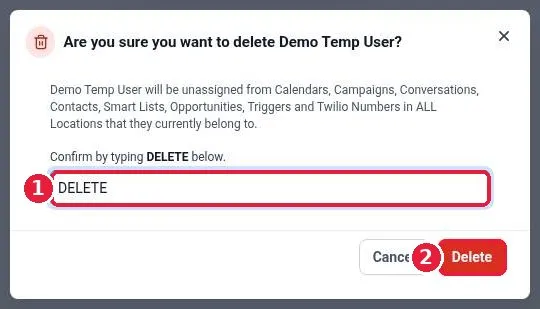
Remove a team member in Reachific: go to Settings, Users, click the trash icon on that user's row, type DELETE to confirm, and click Delete. The user loses access and is unassigned from calendars, conversations, contacts and opportunities.

remove userdelete userteam memberusershelp center
How do I let contacts manage their email preferences?

How do I let contacts manage their email preferences?

Sayo Tadashi
Published on: 04/11/2026

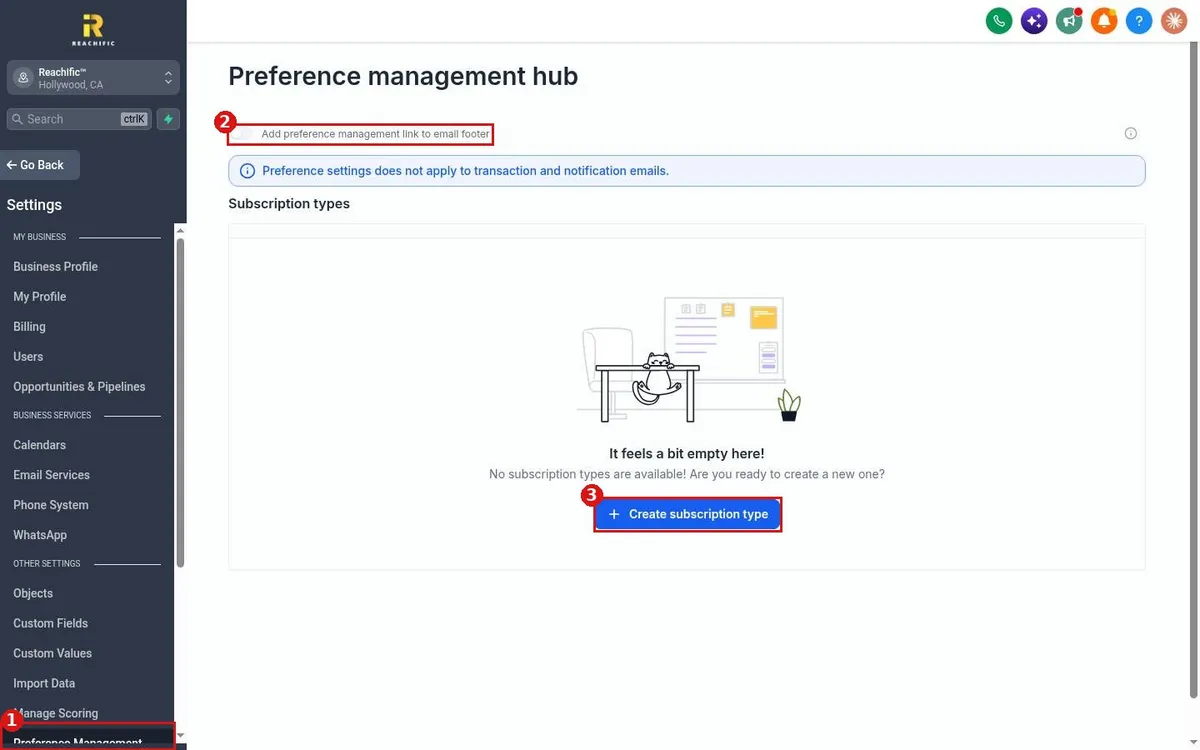
Let contacts choose which Reachific emails they get: go to Settings, Preference Management, create subscription types such as Newsletter or Promotions, then turn on the preference management link in your email footer.

email preferencespreference managementunsubscribesubscription typeshelp center
How do I set up a dedicated sending domain for email?

How do I set up a dedicated sending domain for email?

Sayo Tadashi
Published on: 04/11/2026

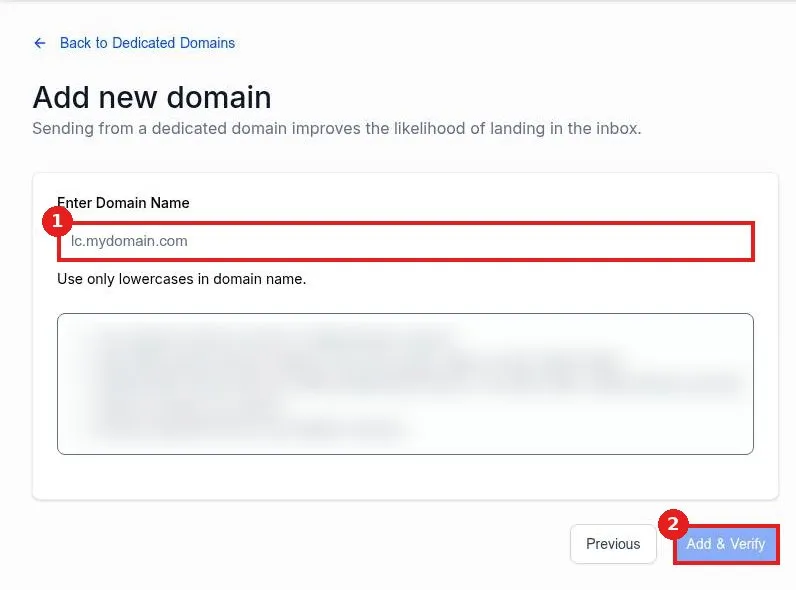
Set up a dedicated sending domain in Reachific: go to Settings, Email Services, click Dedicated Domain And IP, click Add Domain, enter a subdomain such as mg.yourdomain.com, click Add and Verify, then add the DNS records at your domain provider.

email domaindedicated sending domainSPFDKIMdeliverabilityhelp center
How do I port my existing number to Reachific?

How do I port my existing number to Reachific?

Sayo Tadashi
Published on: 04/11/2026

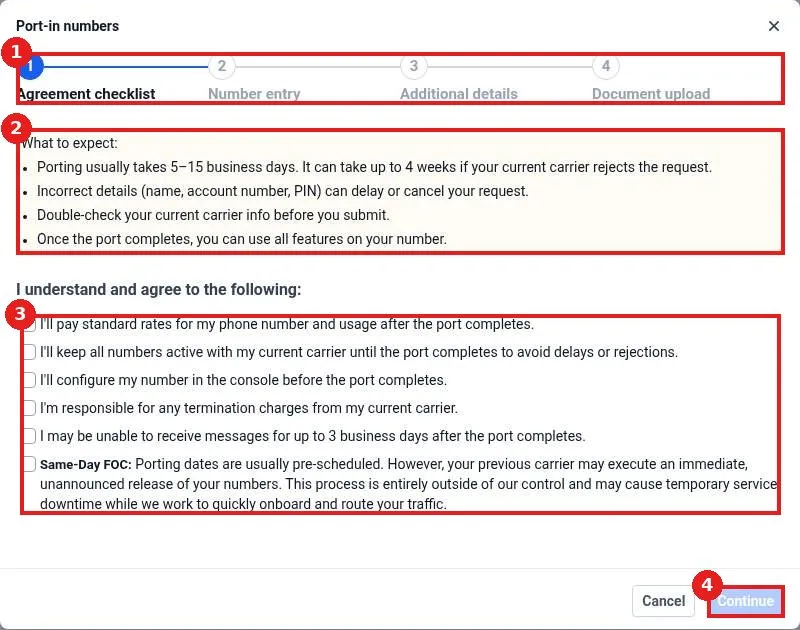
Port your existing number to Reachific: go to Settings, Phone System, click Add Number, choose Port-In Numbers, agree to the checklist, enter the number and carrier account details, upload a bill, and submit. Porting takes 5 to 15 business days.

port numbertransfer numberphone systemhelp center
How do I register for A2P 10DLC texting?

How do I register for A2P 10DLC texting?

Sayo Tadashi
Published on: 04/11/2026

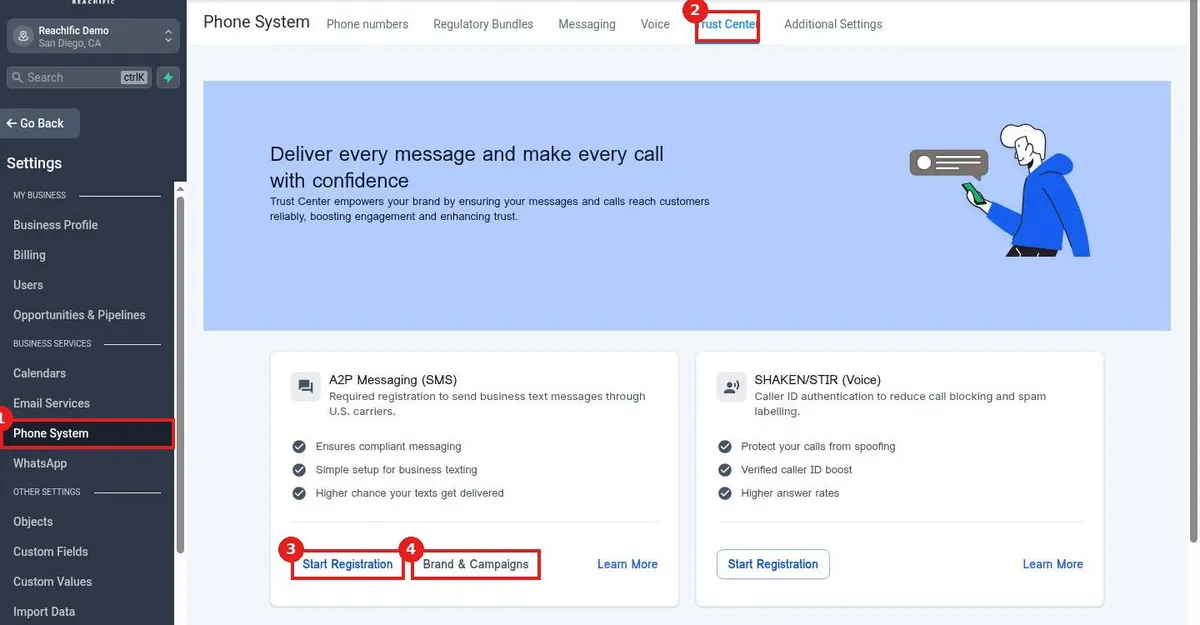
Register for A2P 10DLC texting in Reachific: go to Settings, Phone System, Trust Center, click Start Registration on A2P Messaging, enter your business details, address and contact, then your campaign use case and consent, and submit.

A2P 10DLCtexting registrationtrust centerSMS compliancehelp center
How do I try beta features in Labs?

How do I try beta features in Labs?

Sayo Tadashi
Published on: 04/11/2026

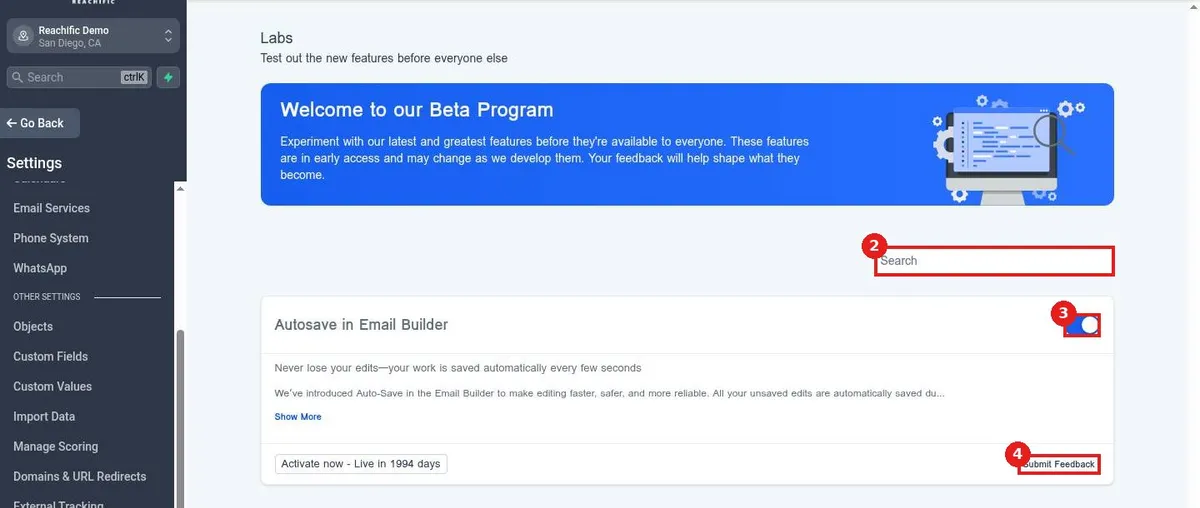
Try beta features in Reachific Labs: go to Settings, Labs, search or scroll the list, turn on a feature with its toggle, and use Submit Feedback to tell the team what you think.

labsbeta featuresnew featureshelp center
How do I see who changed what with audit logs?

How do I see who changed what with audit logs?

Sayo Tadashi
Published on: 04/11/2026

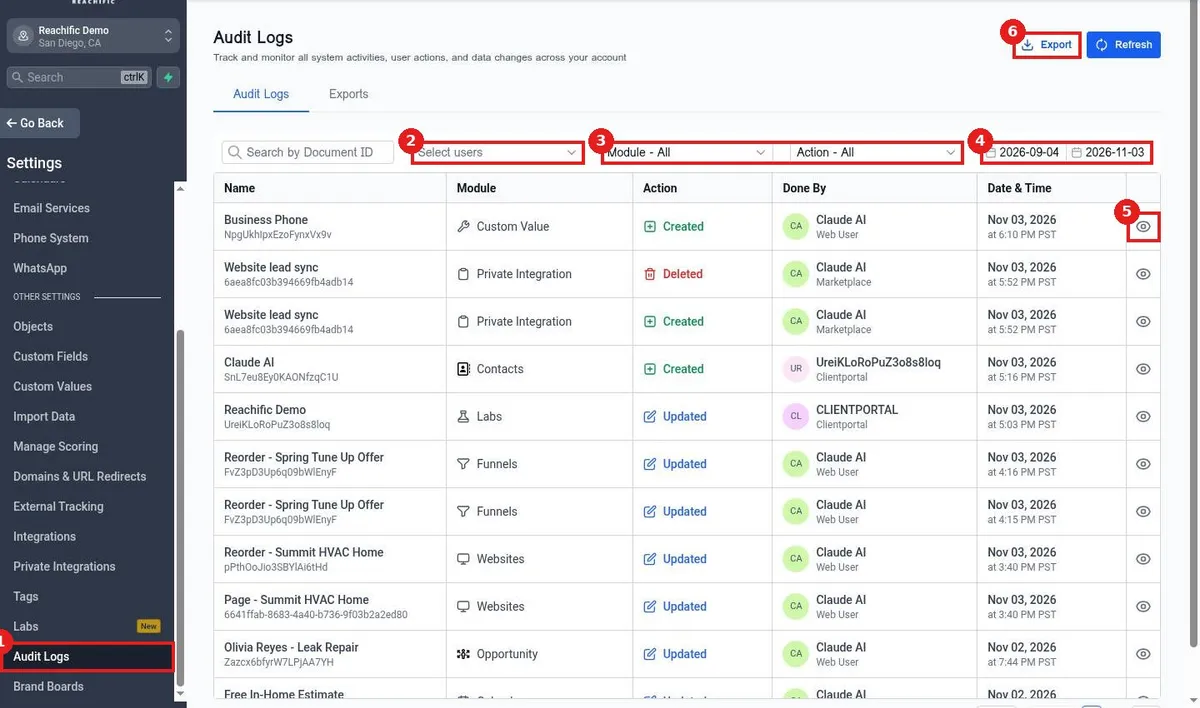
See who changed what in Reachific: go to Settings, Audit Logs, filter by user, module, action and date range, then click the eye icon on a row to see the exact change. Use Export to download the log.

audit logshistorychange loghelp center
How do I add tracking code like Google Analytics or Meta Pixel?

How do I add tracking code like Google Analytics or Meta Pixel?

Sayo Tadashi
Published on: 04/11/2026

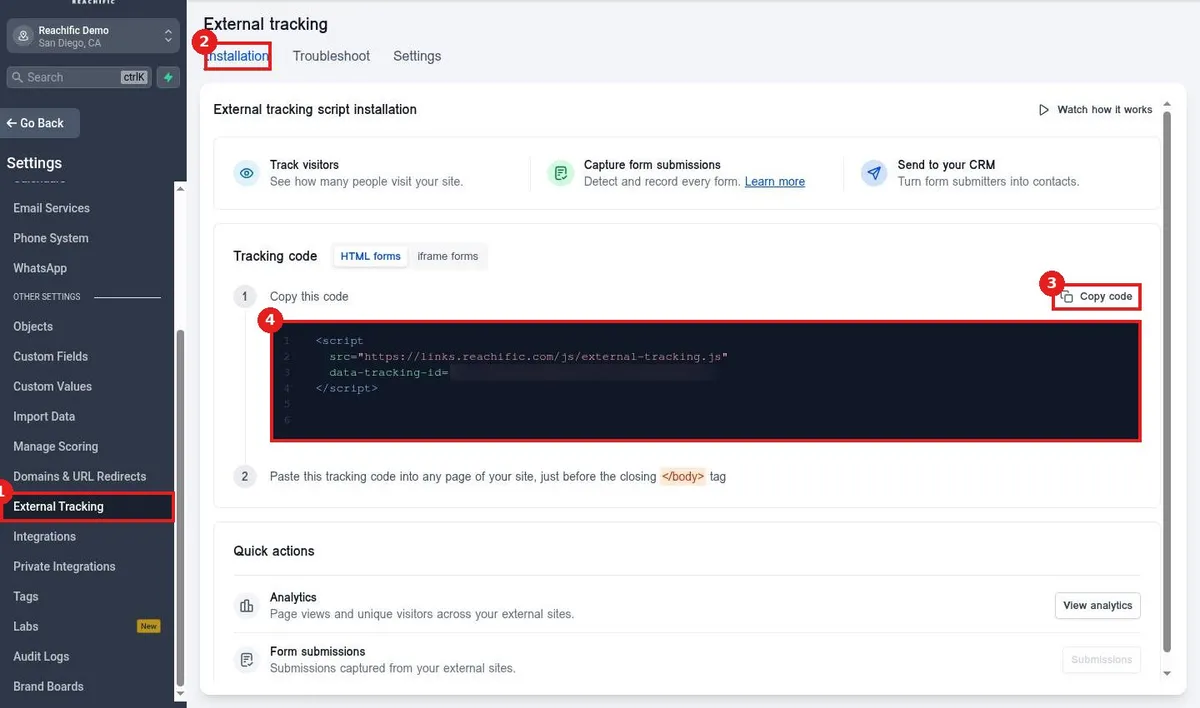
Add tracking code in Reachific: for Google Analytics or Meta Pixel, paste the code in your website Settings head tracking code. For outside sites, copy the External Tracking script from Settings and paste it before the closing body tag.

tracking codeGoogle AnalyticsMeta PixelGA4help center
How do I manage tags in settings?

How do I manage tags in settings?

Sayo Tadashi
Published on: 04/11/2026

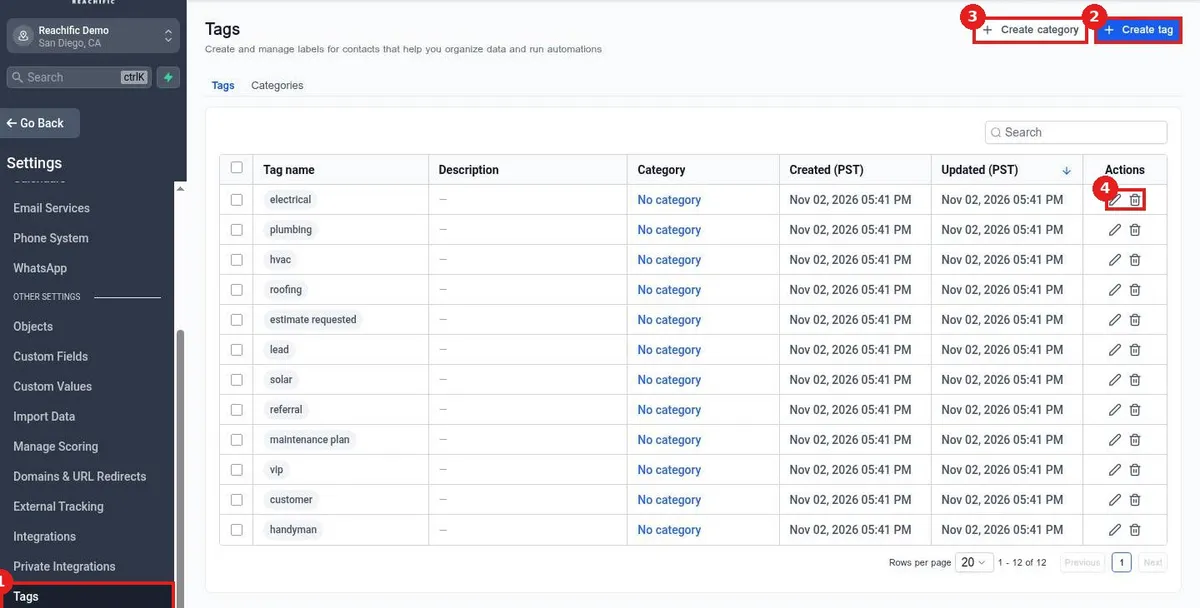
Manage tags in Reachific settings: go to Settings, Tags to see every tag, click Create tag to add one with a category, description and color, or use the pencil and trash icons to edit or delete tags.

tagstag settingscontact tagshelp center
How do I set up lead scoring?

How do I set up lead scoring?

Sayo Tadashi
Published on: 04/11/2026

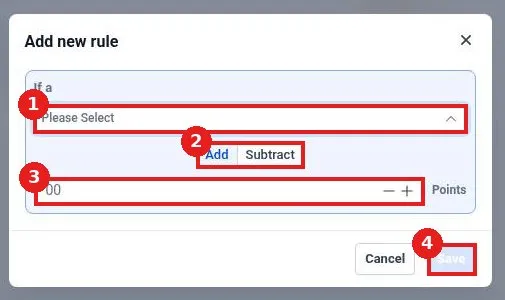
Set up lead scoring in Reachific: go to Settings, Manage Scoring, turn on Engagement Score, click Add new rule, pick an action, choose Add or Subtract, enter points and click Save.

lead scoringengagement scorescoring ruleshelp center
How do I import data in settings?

How do I import data in settings?

Sayo Tadashi
Published on: 04/11/2026

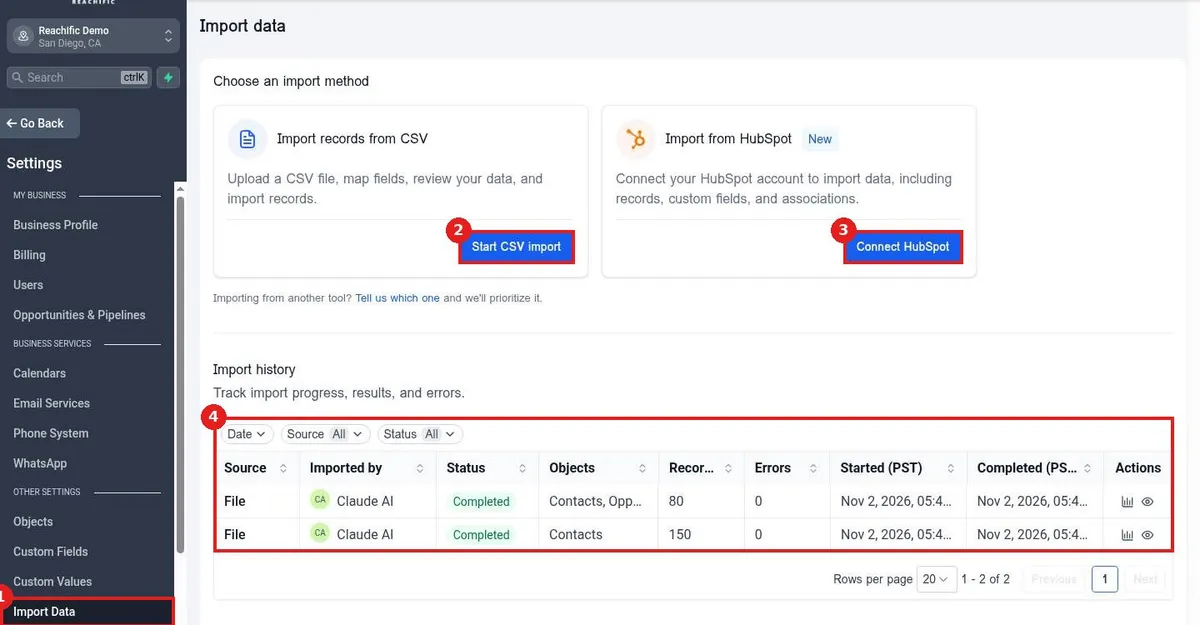
Import data in Reachific settings: go to Settings, Import Data, click Start CSV import to upload a file and map fields, or Connect HubSpot to bring records over. Track each import in Import history.

import dataCSV importHubSpot importhelp center
How do I create custom objects?

How do I create custom objects?

Sayo Tadashi
Published on: 04/11/2026

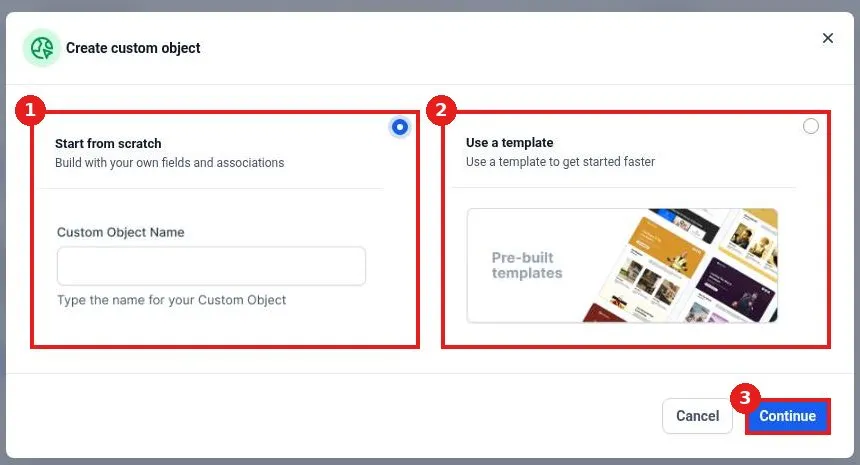
Create a custom object in Reachific: go to Settings, Objects, click Add custom object, choose Start from scratch and name it or Use a template, then click Continue and add fields and associations.

custom objectsobjectsdata modelhelp center

We are here to help

Still stuck?

Send our support team a ticket and we will walk you through it, or pick a support plan for hands on help.