
How do I set up lead scoring?
Quick answer: Go to Settings > Manage Scoring and turn on Engagement Score. Click Add new rule, choose what happens in If a, pick Add or Subtract, enter the points and click Save.
Before you start
- Decide which actions show buying interest, such as opening emails, replying or booking.
- Use the score in smart lists and workflows to follow up with your hottest leads first.
Step 1: Open Manage Scoring
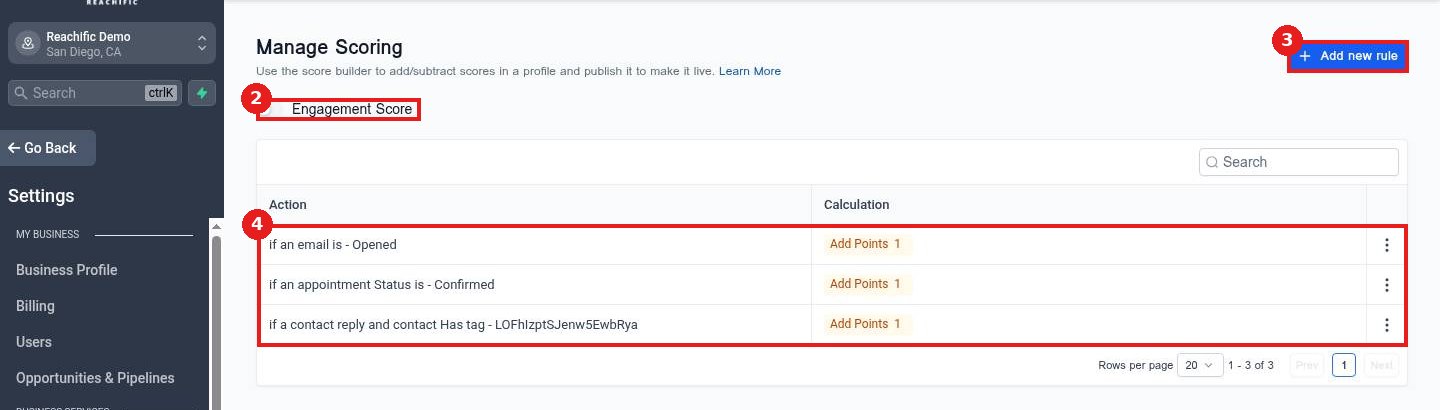
Click Manage Scoring (1). Turn on Engagement Score (2). Your rules (3) show each action and its points. Click Add new rule (4).
Step 2: Build the rule
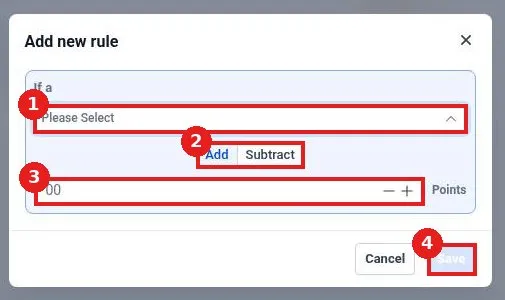
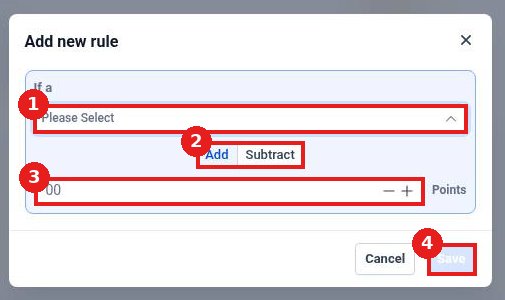
Pick the action in If a (1). Choose Add or Subtract (2), enter the points (3) and click Save (4).
FAQ
Can scores go down?
Yes. Use Subtract for actions like unsubscribing.
Where do I see a contact's score?
On the contact record and as a filter in smart lists.
Can a workflow use the score?
Yes. Use it in conditions to route hot leads to your team.
Want us to handle it? Our team sets up your account settings, data and tracking so everything matches how your business really works. Book a free strategy call and get a free quote.
Related articles
- How do I add or remove tags on contacts?
- How do I send a bulk text or email to a list?
- How do I add actions like send text, send email and wait?
Still stuck? Submit a ticket and our team will help. Need faster answers? See our support plans.
