Home > Help Center

Reachific™ Support

Reachific Help Center

Step by step answers for every part of your Reachific account, with screenshots that show you exactly where to click.

No article on this page matches that yet. Try another word, or submit a ticket.

Newest articles

How do I remove a team member?

How do I remove a team member?

Sayo Tadashi
Published on: 04/11/2026

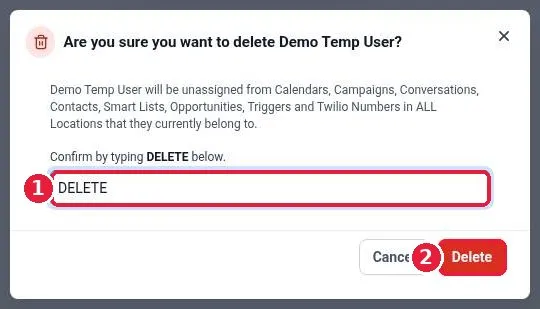
Remove a team member in Reachific: go to Settings, Users, click the trash icon on that user's row, type DELETE to confirm, and click Delete. The user loses access and is unassigned from calendars, conversations, contacts and opportunities.

remove userdelete userteam memberusershelp center
How do I assign a conversation to a team member?

How do I assign a conversation to a team member?

Sayo Tadashi
Published on: 04/11/2026

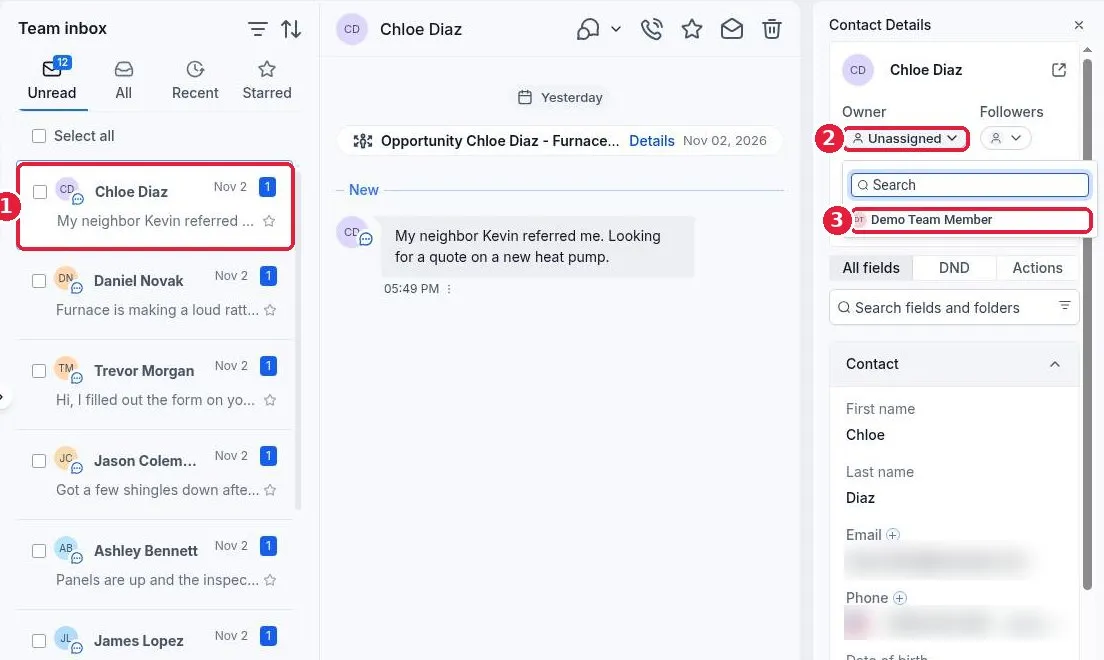
Assign a conversation in Reachific: open Conversations, click the conversation, then in Contact Details click Owner and pick the team member. The conversation and contact now belong to that person, and the inbox can be filtered to show what is assigned to each user.

assign conversationteam inboxownerconversationshelp center
How do I fix a domain that will not connect?

How do I fix a domain that will not connect?

Sayo Tadashi
Published on: 04/11/2026

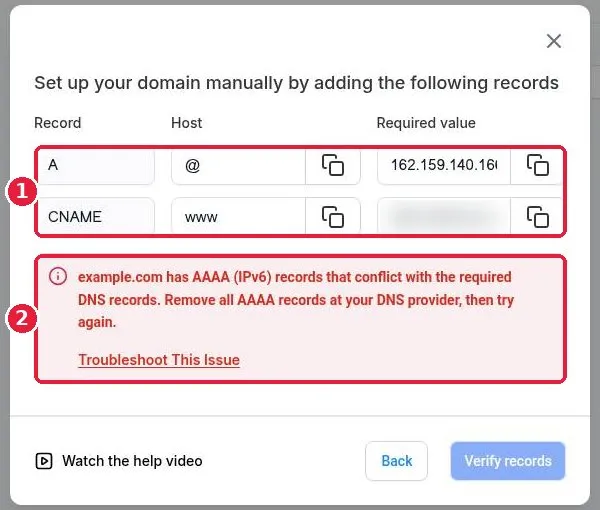
Fix a Reachific domain that will not connect: copy the exact A and CNAME records from Add record manually, delete conflicting AAAA, A or CNAME records at your provider, wait for DNS to update, click Verify records, then finish linking the domain to a product so SSL can issue.

domain not connectingDNS errorSSLAAAA recordhelp center
How do I generate my XML sitemap?

How do I generate my XML sitemap?

Sayo Tadashi
Published on: 04/11/2026

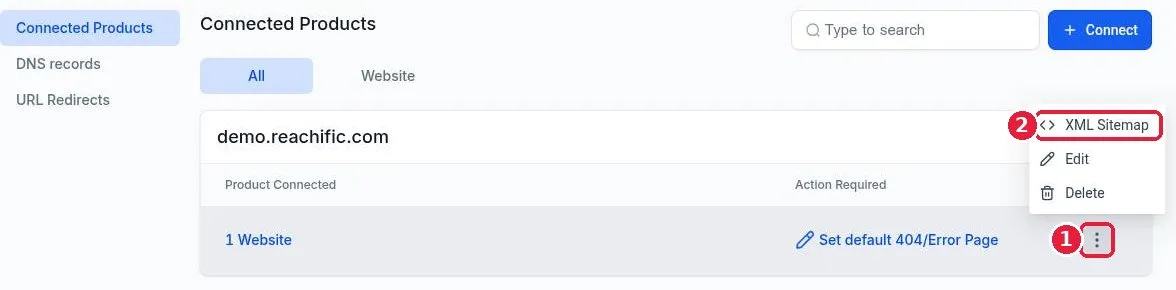
Generate an XML sitemap in Reachific: go to Settings, Domains and URL Redirects, click Manage on your domain, open the three dot menu on the product row, choose XML Sitemap, tick your site or pages, click Proceed, then Generate and Save. Your sitemap lives at yourdomain.com/sitemap.xml.

XML sitemapsitemapGoogle Search ConsoleSEOhelp center
How do I set up URL redirects?

How do I set up URL redirects?

Sayo Tadashi
Published on: 04/11/2026

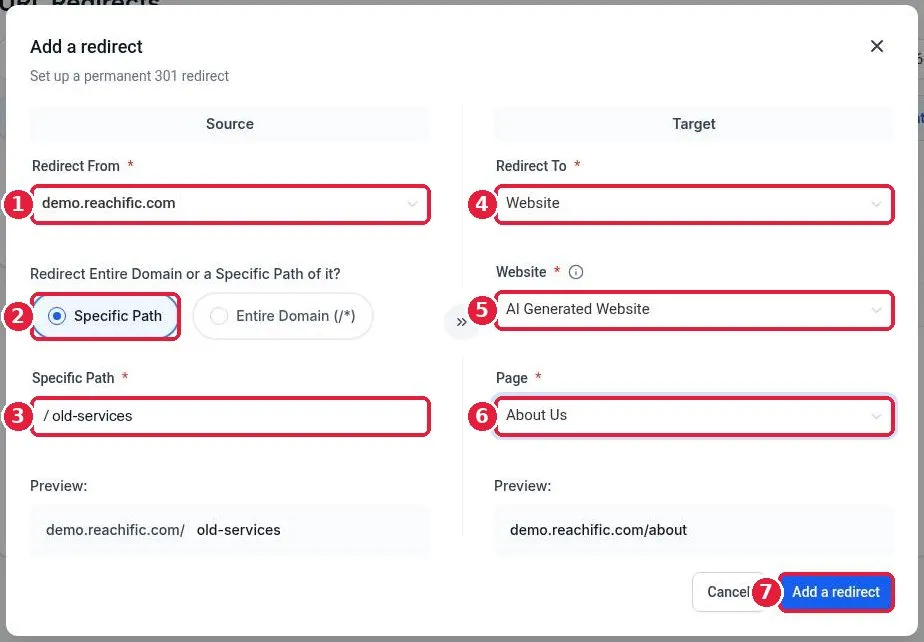
Set up a URL redirect in Reachific: go to Settings, Domains and URL Redirects, open the URL Redirects tab, click Add a redirect, pick your domain and the old path, choose where it should go (a page, funnel or custom URL), and click Add a redirect. Reachific uses a permanent 301 redirect.

URL redirects301 redirectdomainsSEOhelp center
How do I connect a domain I bought at GoDaddy or Namecheap?

How do I connect a domain I bought at GoDaddy or Namecheap?

Sayo Tadashi
Published on: 04/11/2026

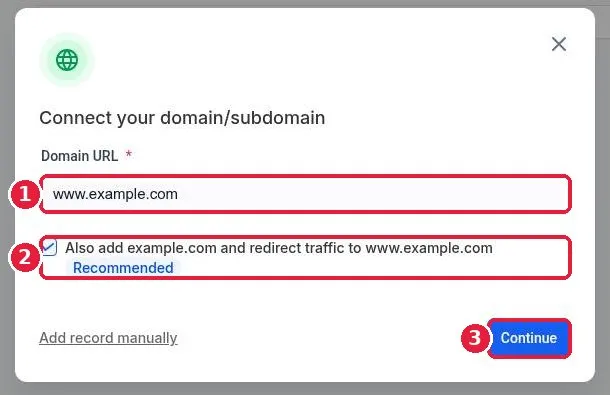
Connect a GoDaddy or Namecheap domain to Reachific: go to Settings, Domains and URL Redirects, click Connect a domain, enter your domain, approve the automatic connect at your provider (or add the A and CNAME records by hand), then link it to your website.

GoDaddyNamecheapDNS recordscustom domainhelp center
What is included in each Reachific plan?

What is included in each Reachific plan?

Sayo Tadashi
Published on: 04/11/2026

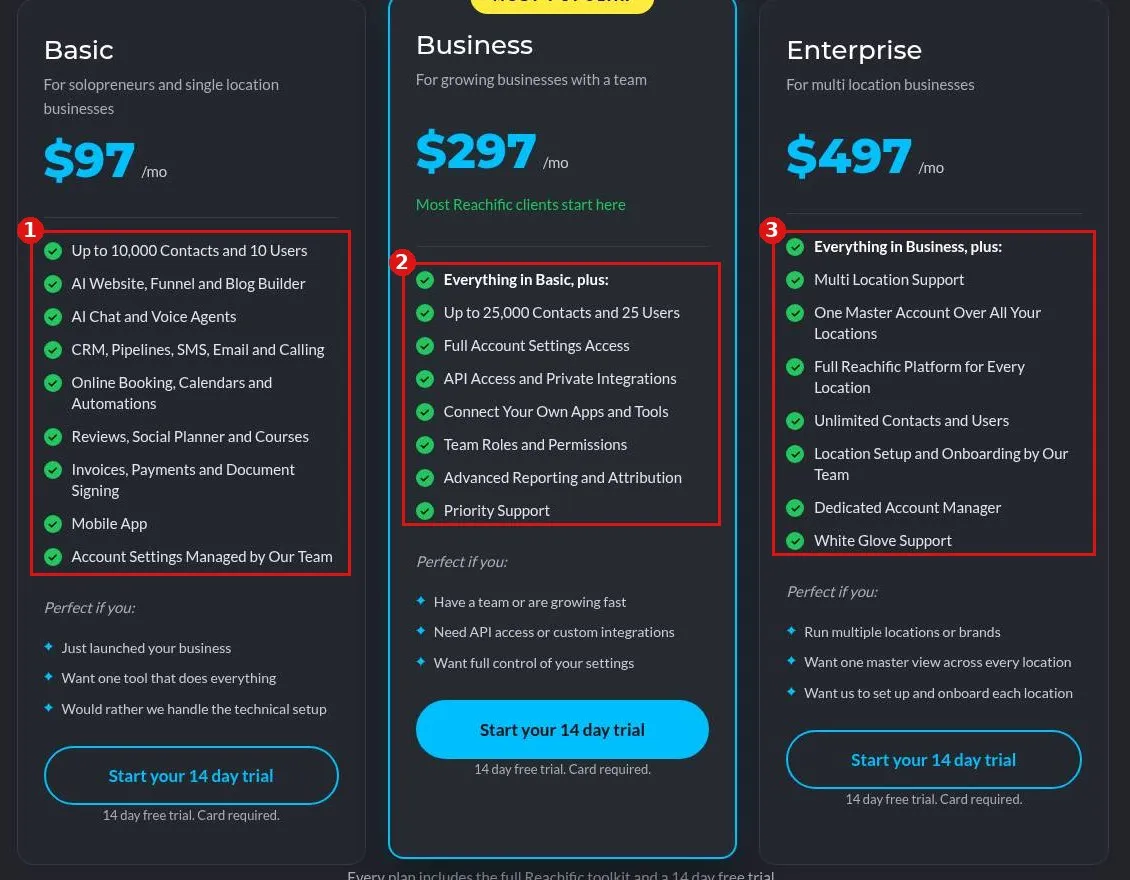
Reachific Basic starts at $97/mo for up to 10,000 contacts and 10 users, Business at $297/mo adds 25,000 contacts, 25 users, API access and full settings, and Enterprise at $497/mo adds multi location and unlimited contacts and users.

planspricingBasicBusinessEnterprisefeatures by planhelp center
How do I read my Reachific Pulse report?

How do I read my Reachific Pulse report?

Sayo Tadashi
Published on: 04/11/2026

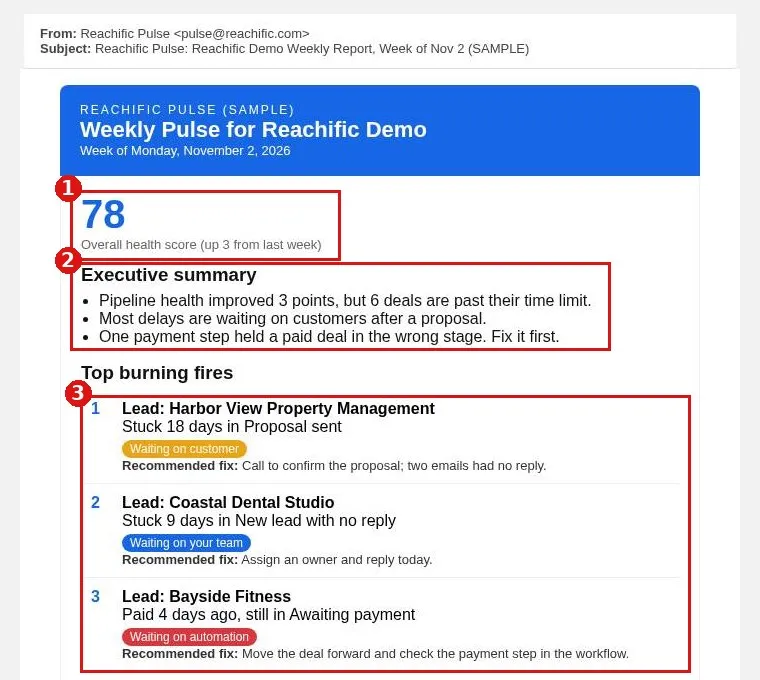
Read your weekly Reachific Pulse report from top to bottom: health score, executive summary, top burning fires with a recommended fix, week over week KPIs, team follow up, where deals stall and automation health.

PulsePulse reportweekly reportpipeline reportKPIshelp center
How do I give sub-account users access to AI Studio?

How do I give sub-account users access to AI Studio?

Sayo Tadashi
Published on: 04/11/2026

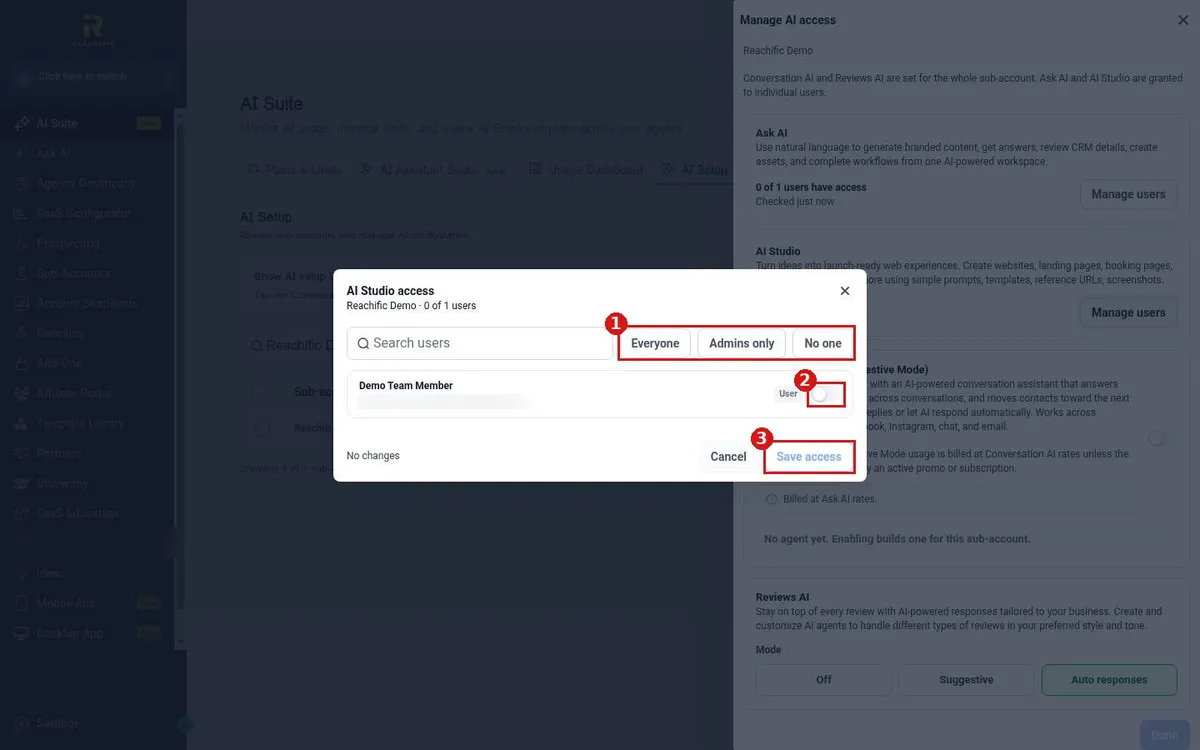
AI Studio access in Reachific is granted per user. Our team can turn it on for everyone, admins only, no one, or chosen users. Submit a ticket with the users who need it and we switch it on for you.

AI Studio accessAI Studio userspermissionsAsk AI accesshelp center
How do I let contacts manage their email preferences?

How do I let contacts manage their email preferences?

Sayo Tadashi
Published on: 04/11/2026

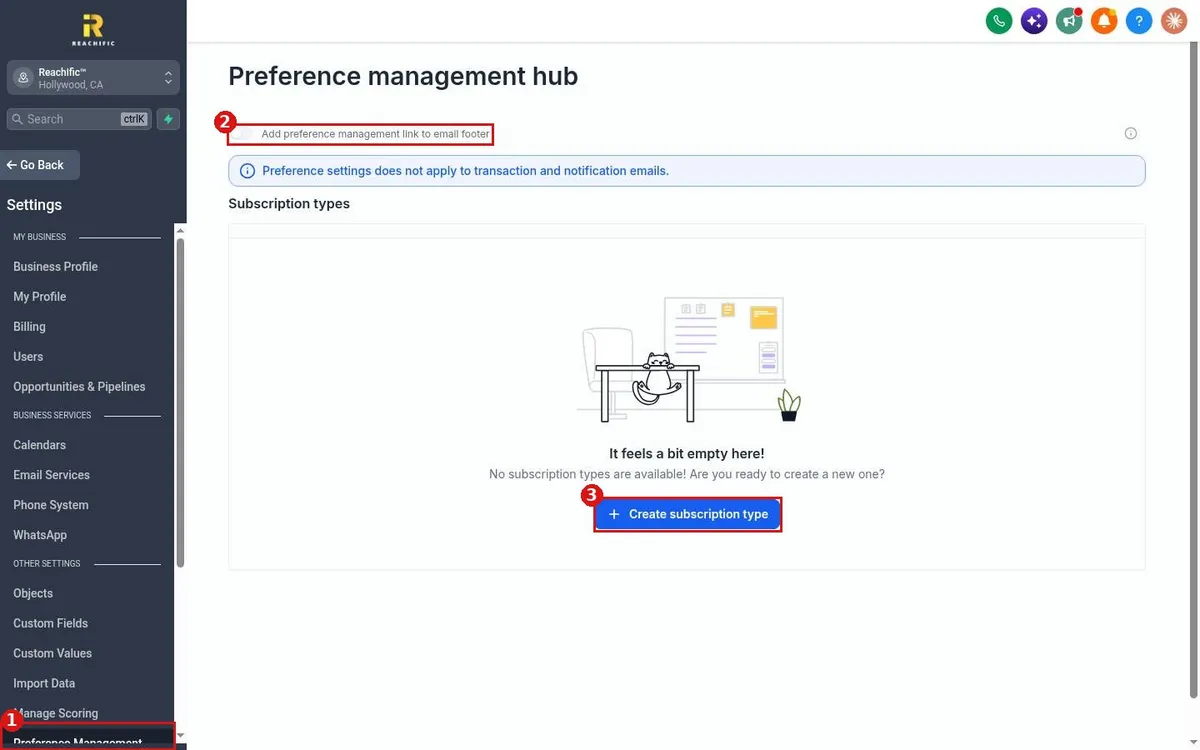
Let contacts choose which Reachific emails they get: go to Settings, Preference Management, create subscription types such as Newsletter or Promotions, then turn on the preference management link in your email footer.

email preferencespreference managementunsubscribesubscription typeshelp center
How do I merge duplicate contacts?

How do I merge duplicate contacts?

Sayo Tadashi
Published on: 04/11/2026

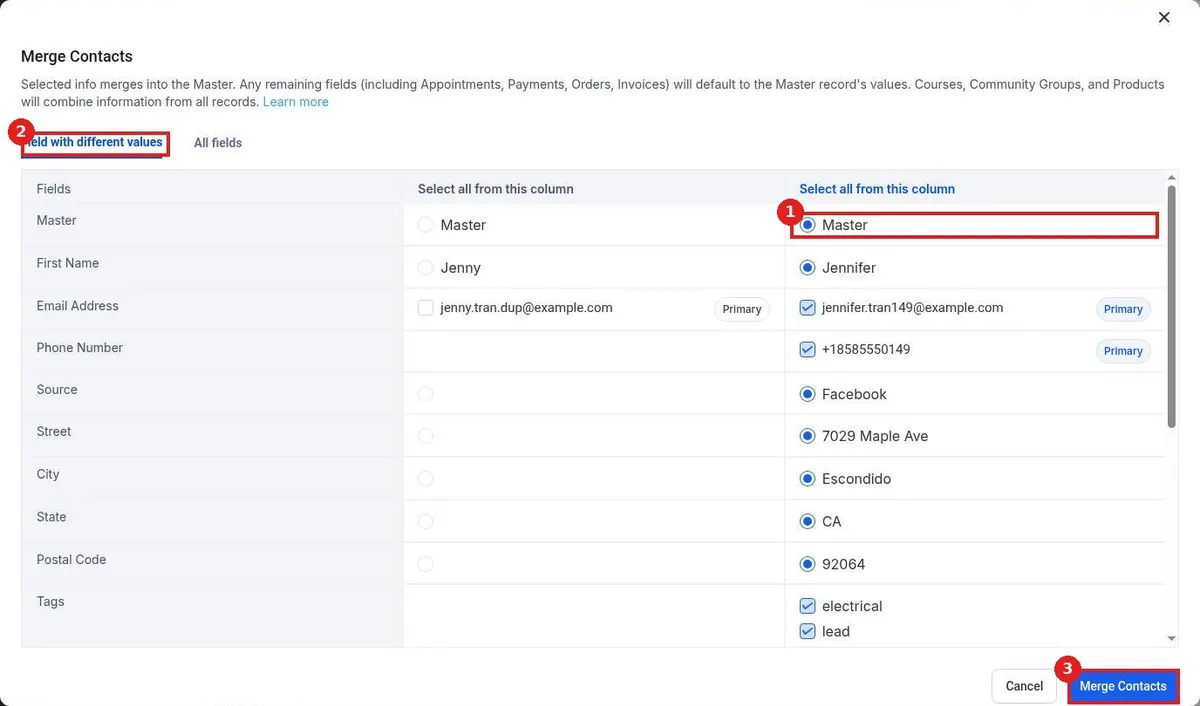
Merge duplicate contacts in Reachific: in Contacts, check the boxes next to the duplicates, click More, then Merge. Pick the Master record and which values to keep, then click Merge Contacts. The extra record is folded into the Master.

merge contactsduplicatesduplicate contactsclean up contactshelp center
What are the Reachific support plans and response times?

What are the Reachific support plans and response times?

Sayo Tadashi
Published on: 04/11/2026

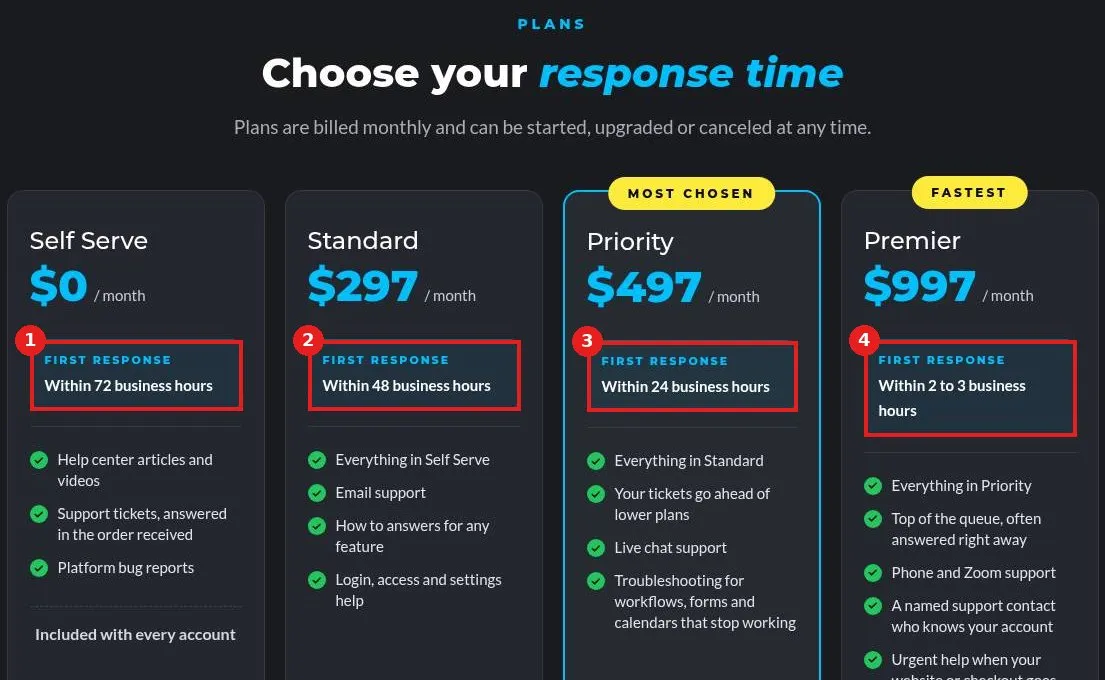
Reachific support plans set how fast a person first replies: Self Serve is included with every account (72 business hours), Standard 48, Priority 24 and Premier 2 to 3 business hours. Paid plans are starting at $297 a month and can be changed any time.

support plansresponse timeSLAcustomer supporthelp center

We are here to help

Still stuck?

Send our support team a ticket and we will walk you through it, or pick a support plan for hands on help.