
How do I use Content AI to write emails, posts and pages?
Quick answer: Content AI works inside the tools you already use. Look for the AI or Write using AI buttons in the email builder, Social Planner, blog editor, funnels and websites. Everything it writes is tracked under AI Agents > Content AI.
Before you start
- AI usage is billed from your wallet.
- Set up a brand voice so drafts sound like you. See How do I create a brand board for my colors and fonts?
Step 1: Write with AI where you work
- Emails: in an email campaign, click Write using AI next to the subject line, or use the Email AI panel in the builder. See How do I build an email template?
- Social posts: use the AI option when creating a post in Social Planner.
- Blog posts and pages: use the AI tools in the blog and page editors.
Step 2: Review your AI content
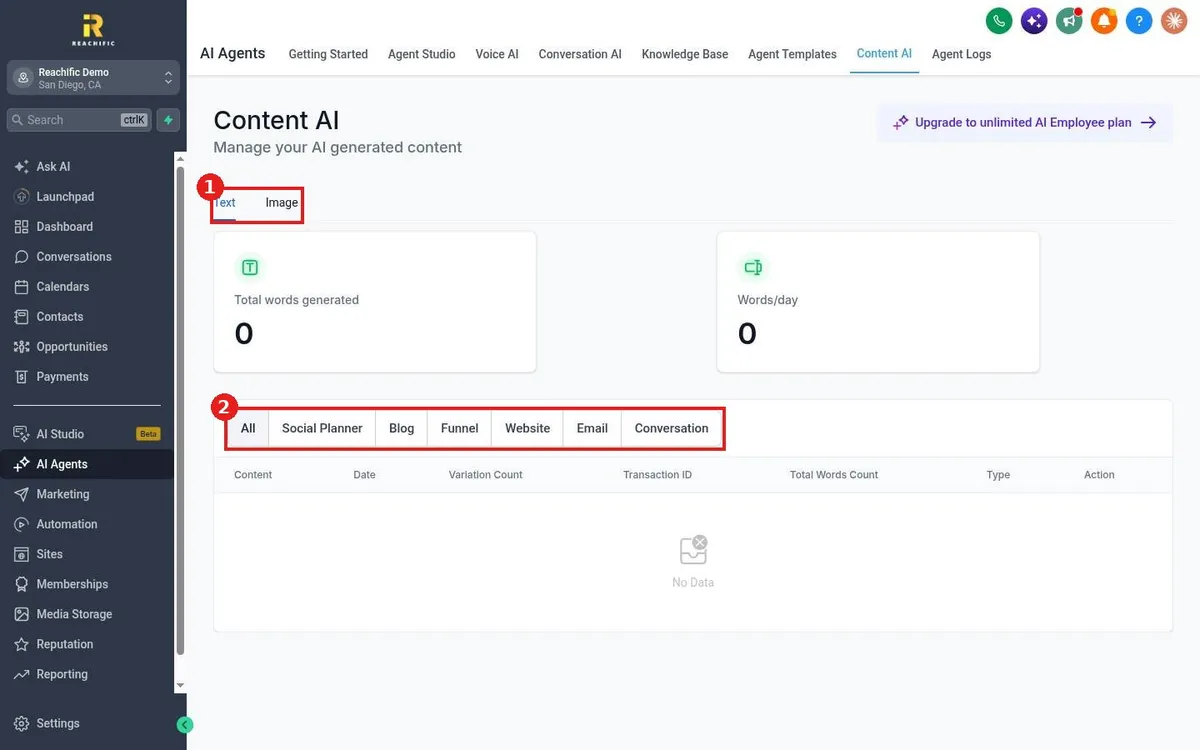
- Click AI Agents in the left menu, then Content AI.
- Switch between Text and Image (1).
- Filter by where it was used (2): Social Planner, Blog, Funnel, Website, Email or Conversation.
- The cards at the top show total words generated and words per day.
FAQ
Should I publish AI drafts as is?
Always read and edit first. Check facts, prices and local details before anything goes out.
Is there a plan with unlimited AI?
An unlimited AI Employee plan is offered in the account. Contact our team for current pricing before you upgrade.
Want us to handle it? Our team can produce your emails, posts and pages every month so your marketing never stalls. Book a free strategy call and get a free quote.
Related articles
- How do I send an email campaign to a list?
- How do I schedule a social media post?
- How do I write and publish a blog post?
Still stuck? Submit a ticket and our team will help. Need faster answers? See our support plans.
