
How do I schedule an email campaign?
Quick answer: In your campaign, click Send or schedule, then the Schedule tab. Pick the date and time, fill in the sender, subject and recipients, and click Review and Schedule.
Before you start
- Build the campaign first. See How do I send an email campaign to a list?
- The time uses your account time zone, shown under Schedule at.
Step 1: Open the Schedule tab
- In the email builder, click Send or schedule.
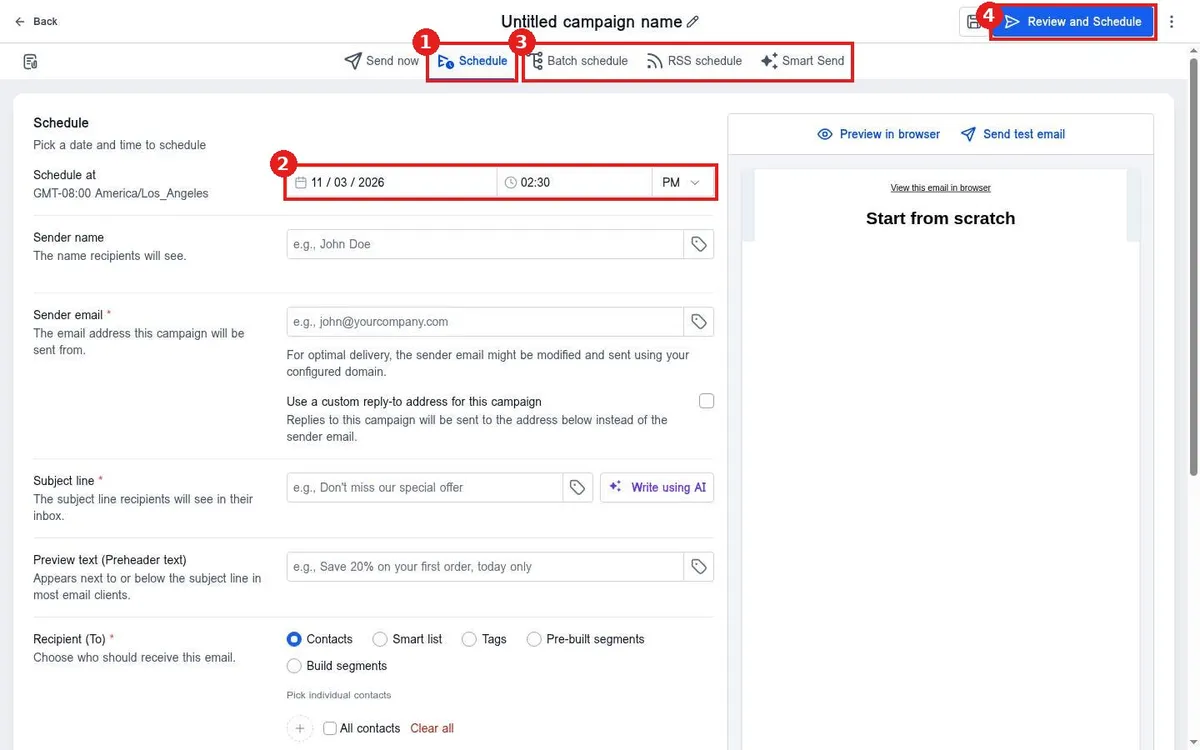
- Click Schedule (1). Other options (3) are Batch schedule to send in groups, RSS schedule and Smart Send.
Step 2: Pick the time and send settings
- Set the date, time and AM or PM under Schedule at (2).
- Fill in sender, subject, preview text and recipients as for a normal send.
- Click Review and Schedule (4).
FAQ
What is Batch schedule?
It sends a large list in smaller groups over time, which can help deliverability.
Can I change a scheduled campaign?
Yes, open it from the Campaigns list before the send time and edit it.
Want us to handle it? Our team can plan and schedule a full email calendar for you. Book a free strategy call and get a free quote.
Related articles
- How do I send an email campaign to a list?
- How do I see email open and click stats?
- How do I schedule a message to send later?
Still stuck? Submit a ticket and our team will help. Need faster answers? See our support plans.
