
How do I find anything fast with the search bar?
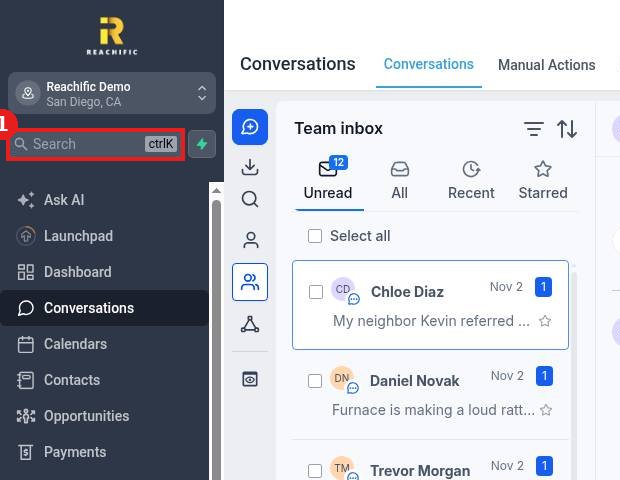
Quick answer: Click Search at the top of the left menu, or press Ctrl K (Cmd K on a Mac). Type a contact name or what you are looking for, use the arrow keys to move through results, and press Enter to open one.
Step 1: Open search
Click the Search box under your business name in the left menu (1). The shortcut is shown right in the box.
Step 2: Type what you need
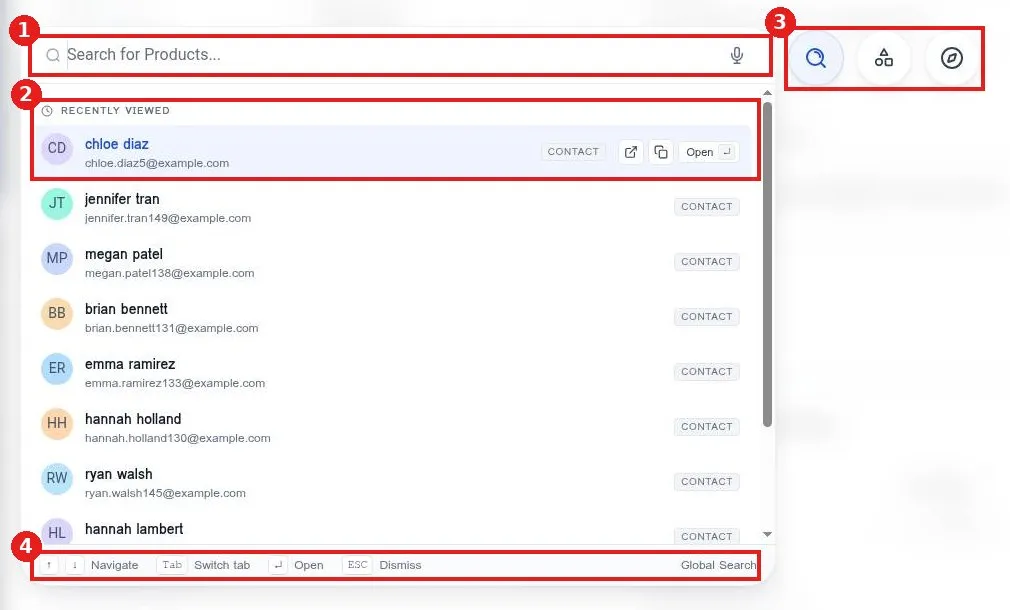
Type in the search box (1). Before you type, Recently viewed (2) shows the contacts you opened last, so you can jump back fast. The microphone lets you search by voice.
Step 3: Move and open
Use the buttons on the right (3) to switch between search modes. The bar at the bottom (4) lists the keys: arrows to navigate, Tab to switch tabs, Enter to open and Esc to close.
FAQ
Why does Ctrl K not work?
Click anywhere on the page first so the browser window is active, then press the keys again.
Can I open a contact in a new tab?
Hover over a result to see the open in new tab and copy buttons.
How do I close search?
Press Esc or click outside the window.
Want us to handle it? Our team can train your staff on Reachific so they find everything fast. Book a free strategy call and get a free quote.
Related articles
- How do I read my Reachific dashboard?
- How do I see a contact's full activity history?
- How do I fill in my business profile?
Still stuck? Submit a ticket and our team will help. Need faster answers? See our support plans.
