

How do I add blog categories and authors?
Quick answer: Go to Sites > Blogs and click the settings gear next to Create blog. Open Authors and click Add new author, or open Categories and click Add new category. Then choose them in each post's Category and Author fields.
Before you start
- Categories and authors are shared by every blog in your account.
- Every post needs one category and one author before it can be published.
Step 1: Add an author
In blog settings, open the Authors tab (1). The Categories tab (2) is next to it. Click Add new author (3) and enter the name and details.

Step 2: Add a category
Open the Categories tab (1) and click Add new category (2). Give it a clear label, such as the topic or service it covers.

Step 3: Pick them on a post
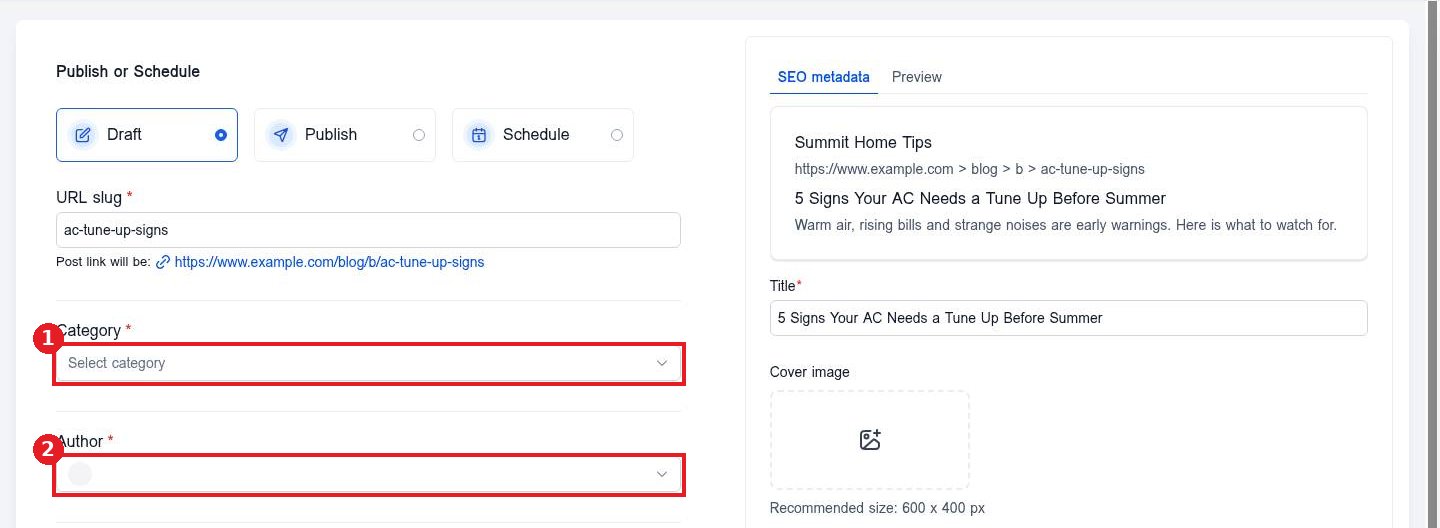
Open a post and click Continue. Choose the Category (1) and Author (2), then publish or update the post.
FAQ
Can a post have more than one category?
Yes. You can pick several categories in the Category field.
Do categories help SEO?
Yes. They group related posts so readers and search engines can find more on the same topic.
Can I rename a category later?
Yes. Edit it in the Categories tab. Posts keep the category.
Want us to handle it? Our team plans and writes search friendly blog content that brings in leads, then publishes it for you on a steady schedule. Book a free strategy call and get a free quote.
Related articles
Still stuck? Submit a ticket and our team will help. Need faster answers? See our support plans.
