
How do I host a WordPress site on Reachific?
Quick answer: Go to Sites > WordPress and click Activate WordPress. Follow the setup to start a new WordPress site or migrate an existing one, then connect your domain. Hosting includes free SSL, a global CDN and automated daily backups.
Before you start
- WordPress hosting may be a paid add on. Check the activation screen before you confirm.
- To migrate, have admin access to your current WordPress site.
Step 1: Open WordPress hosting
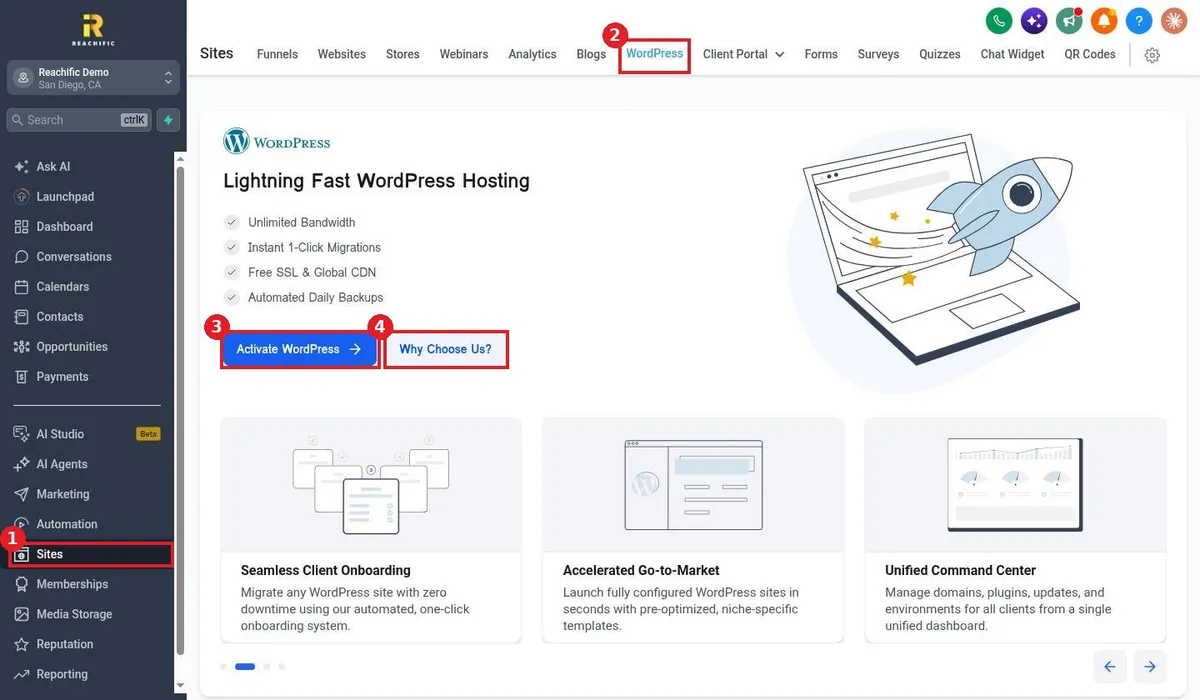
Click Sites (1) and open the WordPress tab (2). Click Activate WordPress (3). Use Why Choose Us? (4) to compare features first.
Step 2: Create or migrate your site
Follow the setup to create a fresh WordPress install or use the one click migration to move an existing site with no downtime.
Step 3: Connect your domain
Point your domain to the new WordPress site from the WordPress dashboard. Free SSL turns on once the domain connects.
FAQ
Can I still use plugins and themes?
Yes. It is full WordPress, so you can install themes and plugins as usual.
Are backups included?
Yes. Sites are backed up automatically every day.
Should I use WordPress or the Reachific site builder?
Use WordPress if you already have a WordPress site or need its plugins. Use the Reachific builder for fast pages tied directly to your forms, calendars and funnels.
Want us to handle it? Our team designs and builds fast, mobile friendly websites that turn visitors into leads, then keeps them updated for you. Book a free strategy call and get a free quote.
Related articles
Still stuck? Submit a ticket and our team will help. Need faster answers? See our support plans.
